
获取 Plesk 产品许可证密钥
有多种方式获取一个或多个 Plesk 产品许可证密钥。
下载免费的试用许可证密钥
Before purchasing a paid license, you can start with a free trial license. With this license, you can evaluate Plesk for 14 days and try it out with up to 3 domains.
To get you free trial license:
-
Go to our website.
-
Fill out the form.
-
You will receive a confirmation email. Confirm your email address.
-
You will receive a trial activation guide by email. Click Get Started inside the email.
-
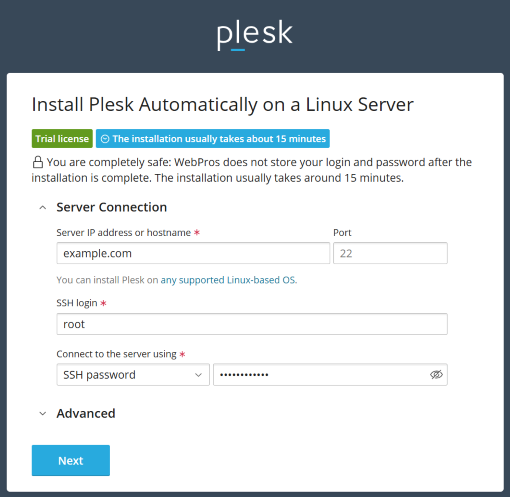
Use the Plesk Web Installer to install Plesk on your server. Specify the following settings:
- Server IP address or hostname. Specify your server’s Internet address.
- SSH login. Specify your server’s SSH login.
- Connect to the server using. Select the authentication method you want to use to connect to the server: password or SSH key.

-
Click Next.
-
When the setup finishes, you will receive an email with your installation details.
从在线商店购买许可证密钥
试用 Plesk 后觉得满意则可以直接从我们的网站购买一种产品许可证。进入 https://www.plesk.com/plans-pricing/ ,选择最适合您业务需要的许可证类型,最后购买。
通过 Partner API 发行
当您需要快速部署多台 Plesk 服务器时,您可以通过 Partner API 自动化管理产品许可证。参阅 Key Administrator Partner API 3.0: Developer’s Guide 了解详情。
通过 Partner API 管理产品许可证密钥能够:发行新许可证,终止不再使用的许可证,等等。